
Please find below What's New in Version 7.14. If you need any more information please email info@doctech.co.uk or call 0161 667 3390 and speak to one of our team.
Highlights / In Brief:
Two Factor Authentication now available for sites not connected to an external directory
- Workflow
- Send documents with annotations to web service
- Trigger criteria improvements
- New platform API endpoints
- Security and configuration
- IDP: API keys for new users are set automatically
- Optional enforcement of two-step authentication
- Cloud-to-Cloud document transfer
- All configuration elements now in the browser
- On Premises additions
- Web-based Workflow Designer introduced
- New tool: DocuWare Server Manager
Full Details:
Workflow
Send documents with annotations to web service
When integrating a REST web service into a workflow, you can attach the document as part of the web service request. Now, there is a new option for this: you can send the document as a PDF with annotations. Previously, you could only send the original document or a PDF without annotations.
Components: Web-based Workflow Designer, Workflow Designer Desktop App
Applications
- If integrating with DocuWare is not an option, send a complete document, including additional information from stamps and further annotations, to another system via their API to save it there.
- Update such a complete document in another system via their API.
Benefit
- Enhanced automatic document exchange between systems or services
Here's how
- Add a web service activity to your workflow and select either a REST web service or a predefined endpoint, such as the DocuWare Platform API.
- Select an endpoint that sends data (POST or PUT).
- In the Request body, select Send document and then PDF with annotations.
Trigger improvements
The configuration of triggers has been expanded to include a new operator and a new system variable.
Components: Web-based Workflow Designer
Additional operator IS in document triggers
You can now use the IS operator in the WHERE clause to resolve issues with triggers in migrated workflows. After migration, you can modify the conditions for triggers directly in their settings.
New system variable Triggered_User
The Assign_to system variable used in the Desktop App of the Workflow Designer is not supported in all cases in the new, web-based Designer. If you are using system activities such as assignments, expressions or conditions before the first task, use the new Triggered_User system variable instead. This variable is not automatically entered in workflow activities. Therefore, after migrating from the Desktop App Designer, all workflows that relied on the unsupported variables must be updated in the appropriate locations.
More information about triggering workflows.
New platform API endpoints
When using the DocuWare Platform API, you can use two additional calls in the “Web service” activity for creating DocuWare groups and for unclipping documents.
Component: Workflow Designer Desktop App
Applications
- createGroup: Once you have stored the documents for a new project, you create a group with the project name and assign an index value profile to it.
- unclipDocument: When documents are clipped together and stored in the file cabinet, they can be transferred to the document tray, unclipped, and then stored back in the cabinet.
Benefit
- Further automation of routine tasks
Here's how
To use the createGroup endpoint:
- Under Endpoints, select POST /Organization/Groups.
- In the Request Body, specify the following properties:
Id, Name, Active.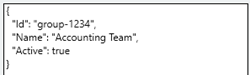
To use the unclipDocument endpoint:
- Under Endpoints, select POST /FileCabinets/{TrayId\FileCabinetId}/Operations/ContentDivide?docId={docId}.
- In the Request route, specify the tray GUID

- In the Request queries, add the Document ID.

Security and configuration
IDP: API keys for new users are set automatically
When creating new users resp. organizations in an IDP configuration in DocuWare, the API key is automatically populated. This eliminates the need to generate the key in the IDP platform and copy it into the IDP configuration in DocuWare.
Component: DocuWare IDP
Note: In the IDP configuration in DocuWare, the Disconnect button remains active. If clicked, the API key is permanently lost. The user must then create a new API key on the IDP platform and use it. This may be necessary, for example, if the user needs to change the client or account they use on the IDP platform.
Require two-step authentication
Following the introduction of the two-step authentication with DocuWare version 7.13, it’s now also possible to require two-step authentication for all users, exceptions allowed. With this feature activated, users must enter a six-digit one-time password each time they log in to DocuWare. They therefore need an authenticator app on their mobile phone such as Microsoft Authenticator or Duo Mobile.
Application
- Implement two-step authentication as a corporate security policy
Benefit
- Higher security level for user login
Here's how
As an organization administrator you can configure two-step authentication within the Security component of the DocuWare Configuration.
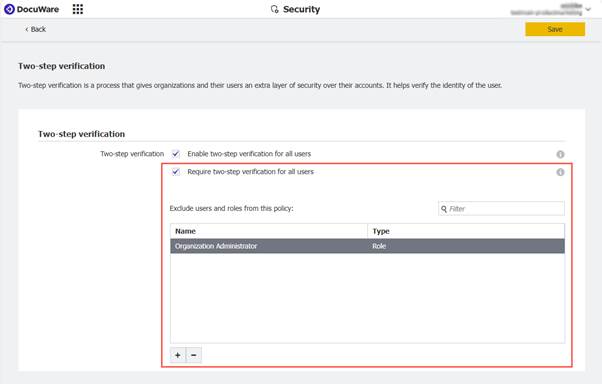
Users can be excluded from the security policy on an individual basis or by role.
Find more information on how to manage the two-step verification on organization level in the documentation.
Cloud-to-Cloud transfer
The Transfer module moves or copies large volumes of documents between file cabinets, within the same organization or between different systems. New on this topic is Cloud-to-Cloud transfer, from one DocuWare Cloud organization to another DocuWare Cloud organization.
Components: DocuWare Cloud, DocuWare Configuration
Applications
- Consolidating documents and file cabinets following a company acquisition
- Separating documents and file cabinets following a corporate spin-off
Here's how
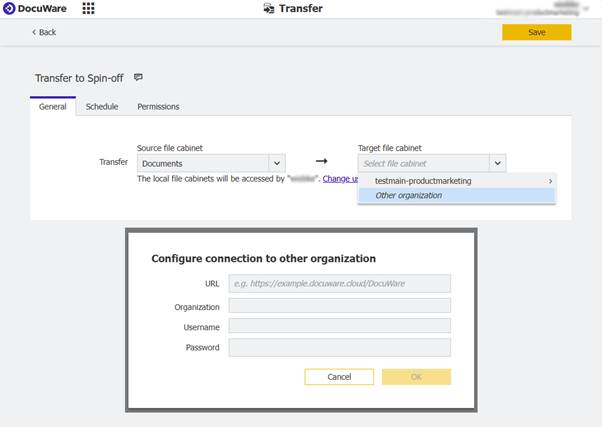
On the “General” tab in the “Transfer” configuration component, you now have the option to connect to another DocuWare Cloud organization:
Configurations completely in the browser
All configuration elements are now available in the browser-based DocuWare Configuration. The former desktop app “DocuWare Administration” is therefor discontinued.
Components: DocuWare Configuration, DocuWare Administration
Benefits
- All configuration elements in one place
- Browser-based access, no need for local desktop app
- Enhanced user experience
Relocation of configuration elements
The last remaining configuration topics from the DocuWare Administration can now be found in DocuWare Configuration, specifically:
- File Cabinet Disks: Transferred as new configuration module within in the “Document Storage” section.
- File Connections: Transferred as new configuration module within in the “Integrations” section.
The configuration consists of parts: "File structure" to configure everything related to the file, and "Columns” to either add or remove columns from the chosen CSV file and to further configure the fields. The "Preview" option allows to check all settings.
With the relocation, you can now upload files directly in the configuration (tab "File Structure"), the use of FTP uploads is not needed anymore. - Effective File Cabinet Rights: The overview is now part of the “User Management” component.
- License Connection Overview: All information about the license usage, including among others user details, license type, and applications in use, is now available on the new tab “Licenses overview” in the “Organization Settings” component.
Additional news for the 7.14 on-premises version
Web-based Workflow Designer for on-premises systems
The new, web-based Workflow Designer is now also available for on-premises DocuWare installations. Discover the enhanced convenience of web-based workflow creation. With the HTML-based Workflow Designer, you can organize and streamline your processes more efficiently than ever before. Create, edit and manage your workflows directly within DocuWare Configuration, from any browser-enabled device. Elevate your productivity and enjoy seamless workflow management, anytime and anywhere.
A migration feature is included to transfer workflows created in the Desktop App to the new Designer, in case you want to edit them.
Applications, benefits and use of the migration feature are the same as for DocuWare Cloud.
DocuWare Server Manager
For on-premises installations, DocuWare introduces the Server Manager as a centralized system management application. It serves as a successor for the on-premises related parts of the DocuWare Administration and for the DocuWare Service Control, but also offers the following additional functionalities:
New functionalities
- Manage DocuWare app pools
- Test a database connection before saving it
- Change a web connection in a single step
Benefits
- Easier administration of DocuWare on-premises systems
Here's how
DocuWare Server Manager is installed and runs on all DocuWare servers.
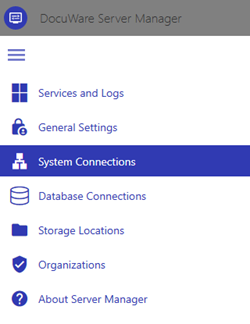
The new system management application with its modern and intuitive user interface
To use the DocuWare Server Manager, you need
- direct access or an RDP connection to the server
- to be an administrator on the Windows server
- to be a DocuWare system administrator